
In my first post, I mapped where GenAI sits in the AI landscape: AI → ML → DL → GenAI. That answered “what is GenAI?” Now comes the practical question: “how does GenAI actually work when I use it?”
To answer that, I need to structure all the other players in the ecosystem: the enablers, platforms, applications. This is where I often get lost, because everyone mixes apps and LLMs and company names together, and it’s not clear what is what. So I open Excel again.
I’ve done the same mapping exercise for the GenAI ecosystem. Here’s what I built.
The Simple Map
GenAI has three layers that work together:
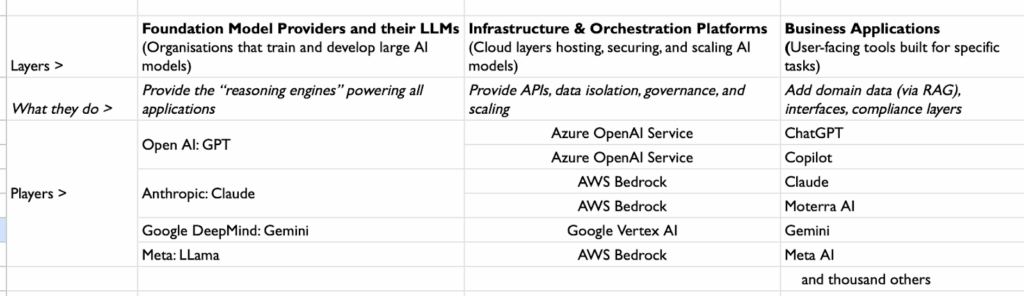
And yeah, I know Excel wasn’t created for this, but old habits die hard, and it works.
How they connect: applications call models through platforms. Your data and controls sit at the platform level.
What Each Layer Actually Does
Models — The Brain
These are the actual AI systems that generate text. GPT-5, Claude 4.5, Gemini Pro—these are the “brains” that learned from massive amounts of text and can now write, summarize, and reason. Think of them as very sophisticated prediction engines that live in the cloud.
Platforms — The Secure Host
Models need somewhere to run safely at enterprise scale. AWS Bedrock, Azure OpenAI Service, and Google Vertex AI are like secure data centers that host the models while adding business controls: permissions, logging, data residency, compliance frameworks.
Applications — The Interface
This is what you actually click on. ChatGPT, Microsoft Copilot, Gemini for Workspace, Moterra Business AI Suite. They take your input, send it to a model (through a platform), and show you the response in a user-friendly way.
RAG — The Lookup
RAG in one line: Some applications can “look up” your internal documents and pass relevant pieces to the model along with your question.
When I ask Moterra’s Business AI Suite “What’s our policy on remote work?” it searches our SharePoint first, then asks Claude 3.5 to answer based on our actual policies. That’s Retrieval-Augmented Generation—it grounds answers in your content, not generic training data.
Why All Layers Matter
I see ads, articles, and conversations where company names, model names, and app names get mixed up constantly. A client recently told me “GPT gives me better answers than Copilot” – though actually he meant ChatGPT app gets better answers than Copilot app. Both use the same GPT models, so in this case the application layer makes the difference.
For me, getting these three layers clear was key to understanding how GenAI actually works. The quality of answers depends on all three layers and how they’re set up together – the model, platform, and application combination matters. Moreover, in some apps combinations are fixed, in some flexible.
Fixed combinations: ChatGPT only uses OpenAI’s models. You can’t switch.
Flexible combinations: Moterra can switch between Claude and GPT-4 depending on what works best for your use case. Perplexity uses multiple models and picks the best one for each query.
When someone builds an app, they choose the model and platform, and decide how much flexibility to build in. More flexibility means more complexity, so some builders choose simplicity and lock to one model.
Understanding these three layers helps you see what’s actually under the hood of any AI tool – and what’s possible to change versus what’s fixed.
How This Works in Practice: The Moterra Story
A client’s IT team ran a network analysis and found employees were uploading company documents to personal ChatGPT accounts throughout the day. The efficiency gains were obvious, but so were the compliance risks. This is exactly why we built Moterra Business AI Suite the way we did.
We chose Claude 3.5 as our model because it’s excellent at understanding complex business documents. We run it through AWS Bedrock because our clients need their data to stay in controlled environments with proper logging and compliance. Our application layer handles the SharePoint integration, so when someone asks “What’s our remote work policy?” it searches their actual documents first, then sends both the question and relevant policy sections to Claude.
The result? Same quality answers as personal ChatGPT, but everything stays inside their security perimeter and respects their existing access controls. Plus, if Claude stops working well for a specific use case, we can switch to GPT-5 without rebuilding everything, that’s the flexibility of understanding all three layers.
When you see the model → platform → application structure clearly, decisions about what works for your situation become much simpler.
My Takeaway
In my first post, I mapped the AI landscape: Artificial Intelligence is the foundation. Machine Learning is the method. Deep Learning is the engine. Generative AI is what creates.
Now we know what happens when we actually use GenAI: models provide the reasoning, platforms handle the security, applications give us the interface. The map is getting clearer.